Weather XL PRO
- 4.3
- Rating
- 10.00M
- Installs
- Free
- Price
 Analysis by App-foxy
Weather XL PRO is a weather app from Exovoid Sàrl that I found most useful when I wanted more than a temperature number and a small rain icon. Its main appeal is the way it turns a forecast into a visual, animated view of changing conditions. That sounds cosmetic at first, but in daily use it can make the forecast easier to understand at a glance, especially when the day moves from clear skies to showers or from calm weather to stronger wind.
I tested it as an everyday weather companion rather than as a specialist meteorological tool. The app is free to start, is suitable for Everyone, and has built a large audience: it has passed 10 million installs, with a 4.4 average from around 505 thousand ratings and about 4.5 thousand written reviews. Those figures suggest that its straightforward presentation works for many people, but popularity does not remove the need to look at how it fits a particular routine.
Why the animated forecast matters
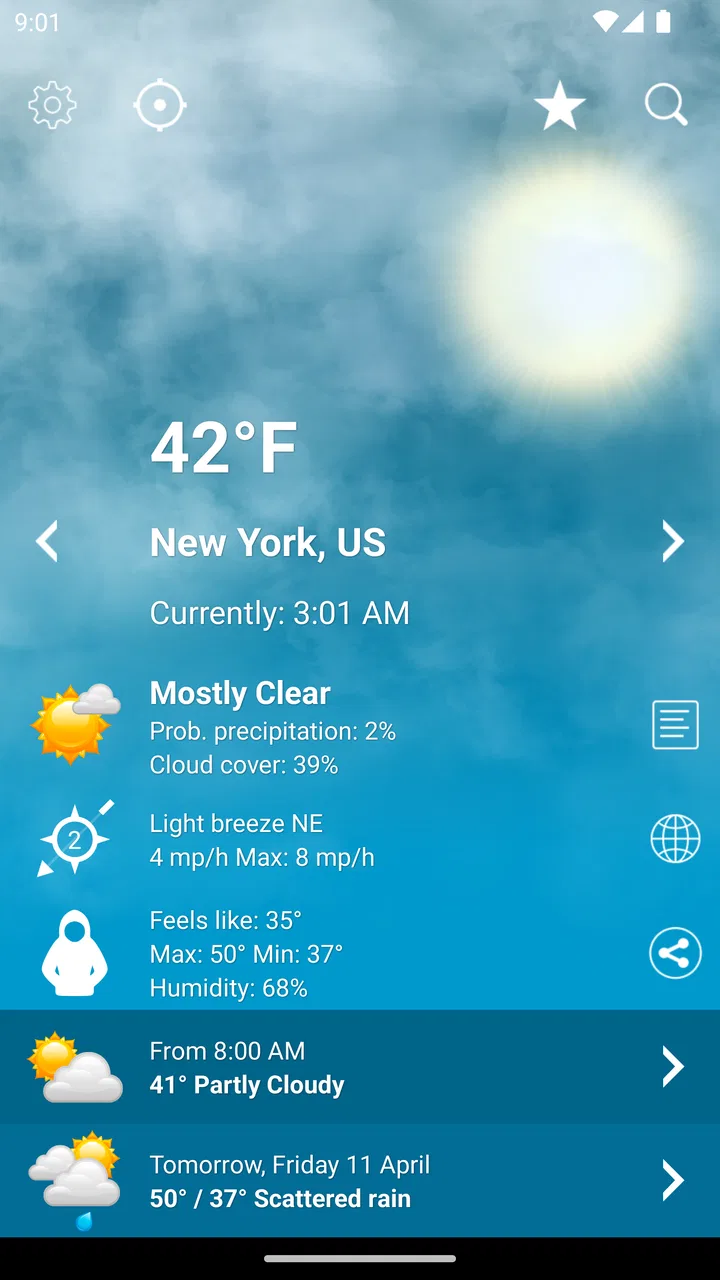
The capability that defines Weather XL PRO is its combination of forecast information and animated presentation. Instead of treating weather as a static card, it gives the day a sense of movement. Clouds, sunlight, rain and other visual changes help me read the general rhythm of the forecast without studying a dense table first.
You May Also Like

 Blood Strike: 2.5 Anniversary
Blood Strike’s Loadouts Turn Every Drop Into a Tactical Gamble
A close look at Blood Strike’s custom loadouts: how fast access to signature weapons reshapes its battle royale rhythm, rewards preparation, and narrows the gap between fights.

 Pandora - Music & Podcasts
Pandora’s Music Is Easy to Start, but Harder to Recover
Pandora’s strength is its low-effort path from a seed to a station. Its weak spot is how much confidence it asks you to place in connection, setup, and quiet recovery.

 8 Ball Pool
 Is Built on Rivalries, Rematches, and Routine
A close look at the rivalries, rematches, shared routines, and unanswered safety questions that turn a quick pool match into a persistent mobile community.

 Samsung Music
’s Quiet Strength Is Playing What You Already Own
Its reach comes less from spectacle than from dependable access to a personal library. That simplicity is both the app’s strongest retention engine and its ceiling.

 AccuWeather: Weather Radar
AccuWeather Review: A Quick, Clear Forecast for Everyday Decisions
For everyday plans, the best forecast is the one you can understand quickly. AccuWeather makes rain timing, radar, and local conditions easy to act on, with a few trade-offs.

 Hill Climb Racing
Why Hill Climb Racing Still Turns Crashes Into One More Run
A tiny car, a bumpy hill and one more upgrade: Hill Climb Racing keeps resurfacing because its simple chaos makes every near-miss feel personal.
More From Our News Desk
View All News


The animation is most useful as a quick interpretation layer, not as a replacement for careful forecast reading. If I am deciding whether to take a jacket, carry an umbrella or change the time of a short outing, the visual sequence gives me an immediate impression of what is ahead. I still want to check the actual forecast details before making a serious travel or outdoor decision, but the app makes the first decision less tedious.
This is where it differs from the basic weather widget that comes with many phones. A standard widget is excellent for checking the current temperature quickly, yet it often compresses the day into a few symbols. Weather XL PRO gives the forecast a more noticeable visual identity. That can be helpful for people who remember patterns better than isolated figures, or who want a weather screen that feels pleasant to open rather than purely functional.
The presentation also makes weather changes easier to notice. A series of similar icons can look harmless even when a wet period is approaching. An animated view encourages me to think in terms of the whole day: clear now, unsettled later, and cooler toward evening. That broader view is the app’s strongest practical idea.
Reading the forecast without overcomplicating it
My preferred way to use the app is to begin with the visual overview, then look more closely at the time period that affects my plans. For a normal workday, I do not need to inspect every forecast detail before leaving home. I want to know whether the morning commute is dry, whether rain is likely around lunch and whether the trip home will feel colder or windier.
Weather XL PRO supports that habit because the visual layer answers the first question quickly: what kind of day is this? I can then decide whether I need more detail. This two-step approach is better than staring at a long forecast when I only need a simple decision.
There is a trade-off here. Animation can make an app feel clearer, but it can also attract attention away from the information itself. If you prefer a compact list of temperatures and precipitation times, the visual style may feel like extra decoration. I would not choose this app solely because it looks lively; I would choose it if that liveliness helps me interpret the day faster.
A realistic morning routine
Imagine a weekday when I have a short walk to public transport, an outdoor lunch break and a longer journey home. I open the app while getting ready and see that the day is not simply “sunny” or “rainy”; the conditions change across the hours. That immediately affects what I carry. I may take a light waterproof layer instead of a heavy coat, or put an umbrella in my bag even if the current sky looks bright.
At lunchtime, I can check again rather than relying on the morning impression. This matters because weather decisions are often made in stages. The app is not only for the first check of the day; its visual forecast is useful when plans shift and I need a quick reminder of the expected pattern.
For a family, the same feature can make planning easier. Showing a child an animated forecast is often more understandable than explaining several numbers. For someone who works outdoors, it can provide a quick first look before consulting a more detailed source. For a casual user, it keeps the forecast approachable instead of making every check feel like a technical task.
How it works in practice
Weather XL PRO is built around the idea that weather information should be easy to scan. I found the app most comfortable when I used it for repeated short checks rather than one long session. The visual design gives me a quick orientation, while the forecast information provides the substance behind it.
The important workflow is to separate “what is happening generally?” from “what exactly happens during my plan?” The app is strong at the first question. It gives me a readable picture of the day and helps me notice transitions. For the second question, I pay closer attention to the relevant forecast period instead of assuming that the overall animation tells the complete story.
That distinction is one of the less obvious lessons of using a visually focused weather app. A beautiful forecast can encourage false confidence if I treat it as a precise guarantee. Weather changes, and a broad visual impression cannot replace checking the timing of rain or the conditions at the specific place I am visiting. I see Weather XL PRO as a decision aid for ordinary planning, not as the only source I would trust for safety-critical conditions.
It also works well as a middle ground between a phone’s built-in weather screen and a highly technical weather service. The built-in option may be faster for a single glance, while a specialist service may provide more layers and professional detail. Weather XL PRO sits between those experiences: more expressive and engaging than a minimal widget, but less intimidating than a tool designed for enthusiasts who want to study every atmospheric variable.
Where the free version fits
The app is available for free, which makes it easy to try without committing immediately. That is important here because the value of animation is personal. Some people will find the visual approach genuinely useful; others will decide that a plain forecast is enough after a few checks.
There are in-app purchases priced at $6.99 per item. I would approach those purchases as optional upgrades to consider only after deciding that the app’s central presentation suits my routine. Paying does not make sense if I only want the current temperature and already have a satisfactory widget. On the other hand, someone who opens the app frequently and appreciates its fuller experience may find the purchase easier to justify.
I also like that the age rating is Everyone. That makes the app suitable for a broad household audience, including people who want a simpler way to discuss the day’s weather. Still, “easy to use” should not be confused with “perfect for every need.” A child can understand the visual forecast, but an adult planning a hike, a flight connection or a long drive should still use appropriate detailed information.
Small habits that make it more useful
One useful habit is to check the forecast twice when the day matters: once before leaving and again before the main outdoor activity. The first check helps with clothing and what to carry; the second helps confirm whether the plan still makes sense. This avoids treating the morning view as a promise that cannot change.
Another is to compare the animated overview with the actual timing that matters to me. If I am walking home at a particular hour, I focus on that period rather than reacting to the most dramatic visual moment in the day. This keeps the app’s attractive presentation in its proper role: helping me notice patterns while I make decisions from the relevant details.
A third tip is to use it as a shared planning screen. When several people are deciding whether to eat outside, run an errand or postpone a walk, a visual forecast can settle the conversation faster than passing around separate numbers. That is a practical advantage I would not expect from the short store description alone.
The best scenario for this app
Weather XL PRO is at its best for everyday planning in places where conditions change enough to matter but do not require professional analysis. Commuting, school runs, errands, casual walks, outdoor lunches and weekend plans are all good examples. In these situations, I want a forecast that invites me to look at the whole day without making me work through a complicated interface.
The strongest scenario is a flexible plan with several possible times. Suppose I want to visit a market, walk through a park and meet a friend later. I can use the visual forecast to identify the more comfortable part of the day, then check the relevant forecast period before choosing the order. The app helps me think about timing rather than simply asking whether the day is good or bad.
It is also a good fit for people who are easily overwhelmed by weather apps filled with maps, radar layers and technical charts. Those tools can be excellent, but they demand more attention. Weather XL PRO offers a gentler starting point. I can get a useful impression quickly and only investigate further when the plan requires it.
People who enjoy attractive interfaces may also gain more from it than users who see weather as a purely utilitarian task. The visual treatment gives the app a stronger personality than a plain list. That matters because an app I enjoy opening is more likely to become part of my routine, and regular checking is often more useful than having a powerful service that I rarely consult.
When another weather option is better
I would skip Weather XL PRO if my priority is maximum technical depth. Someone who regularly studies radar movement, severe-weather warnings, detailed wind behavior or specialist forecasting tools may prefer a dedicated service built around those functions. The animated presentation is not a substitute for that kind of analysis.
I would also hesitate if I dislike visual effects or want the smallest possible amount of information on screen. A simple built-in widget may be better for checking one number with almost no interaction. In that case, Weather XL PRO’s presentation can feel like a longer route to an answer I already know how to get.
Travelers should think about their needs as well. For a holiday, I would use the app for a quick sense of the destination’s daily rhythm, but I would not let a general visual impression decide whether to take part in a demanding outdoor activity. The more consequences a weather decision has, the more important it becomes to consult detailed and timely information alongside this app.
Trade-offs I noticed over time
The central trade-off is clarity versus detail. The app’s visual forecast makes changes memorable, but visual simplicity can encourage me to stop at the overview. I had to develop the habit of looking at the exact period relevant to my plan. Once I did that, the animation became an advantage instead of a distraction.
Another trade-off is personality versus speed. A minimal widget may win when I am rushing and need one glance. Weather XL PRO wins when I want to understand the day as a sequence. Neither approach is universally better; they serve different moments. I would keep a basic widget available for instant checks and open this app when planning requires a little more context.
The free entry point is helpful, but the in-app purchase model means users should decide what they actually need before spending. Since the app’s appeal is tied closely to its presentation and overall experience, trying the free version first is the sensible path. If the visual forecast does not change how I plan my day, an upgrade is unlikely to solve that problem.
There is also a psychological trade-off. Attractive weather animations can make the forecast feel more certain than it is. I remind myself that a smooth visual transition is an explanation of expected conditions, not a guarantee. That caution is especially important when the forecast affects travel, health, work or safety.
Who gains the most from Weather XL PRO?
I think the best audience is the everyday user who wants a forecast that is quick to understand and pleasant to revisit. Commuters, parents, students, casual walkers and people who plan around changing outdoor conditions are likely to appreciate the app’s central idea. It is particularly suitable for someone who finds standard weather screens too dry but does not want a professional meteorology dashboard.
It can also help visual learners. If a sequence of animated conditions communicates more clearly than a row of symbols, the app may make weather planning feel more natural. Families may find that useful when deciding on shared activities, because the forecast becomes something everyone can interpret together rather than a collection of unfamiliar figures.
I would recommend caution for users who need highly specialized information, who dislike animated interfaces or who only want a tiny current-condition widget. Those people may be happier with a built-in weather tool or a more technical alternative. Weather XL PRO is not trying to be every kind of weather service, and its value is strongest when its visual approach matches the way I make ordinary decisions.
Exovoid Sàrl has created an app that makes the forecast feel like a changing scene rather than a static report. Its 4.4 average and audience of more than 10 million installs show that this approach has broad appeal, but my recommendation is still based on fit rather than popularity. I would install the free version, use it through several different kinds of days, and pay attention to whether the animation genuinely improves my planning.
My final view is positive, with a clear boundary: Weather XL PRO is a strong everyday weather companion, especially when I want to understand the flow of a day quickly. Its best feature is not simply that the forecast moves; it is that the movement helps me notice transitions and choose better moments for ordinary plans. If I remember to verify the details that matter and accept that the visual style is not for everyone, the app becomes a useful, friendly part of my daily routine.
FAQs for Weather XL PRO
01What features does Weather XL PRO offer?
Weather XL PRO provides detailed weather forecasts, including temperature, precipitation, wind speed, and humidity. It features animated weather maps, radar, and satellite images. The app also offers hourly and weekly forecasts, alert notifications for severe weather conditions, and customizable widgets for quick access to weather information.
02Is Weather XL PRO available for both Android and iOS?
Yes, Weather XL PRO is available on both Android and iOS platforms. You can download it from the Google Play Store for Android devices and the Apple App Store for iOS devices. The app is designed to provide a seamless experience across mobile devices.
03Does Weather XL PRO require an internet connection to function?
Weather XL PRO requires an internet connection to update weather data and forecasts. While some information may be cached for offline viewing, a stable internet connection is necessary for real-time updates, radar imagery, and receiving weather alerts to ensure accurate and current information.
04Are there any in-app purchases or subscriptions in Weather XL PRO?
Weather XL PRO offers a free version with basic features. However, to access premium features such as ad-free experience, advanced weather maps, and extended forecast data, users may need to make in-app purchases or subscribe to a premium plan. Pricing details are available within the app.
05How accurate is the weather data provided by Weather XL PRO?
Weather XL PRO sources its data from reputable meteorological organizations, ensuring a high level of accuracy. While no weather app can guarantee 100% accuracy due to the unpredictable nature of weather patterns, Weather XL PRO is designed to provide reliable forecasts and timely alerts to its users.
Pros
- Intuitive interface with smooth navigation.
- Accurate and timely weather updates.
- Customizable widgets for home screen.
- Detailed radar and satellite maps.
- Supports multiple locations for tracking.
Cons
- Contains ads in the free version.
- Some features require in-app purchases.
- Occasional app crashes reported.
- Limited offline functionality.
- Battery consumption can be high.

Weather XL PRO
Gallery